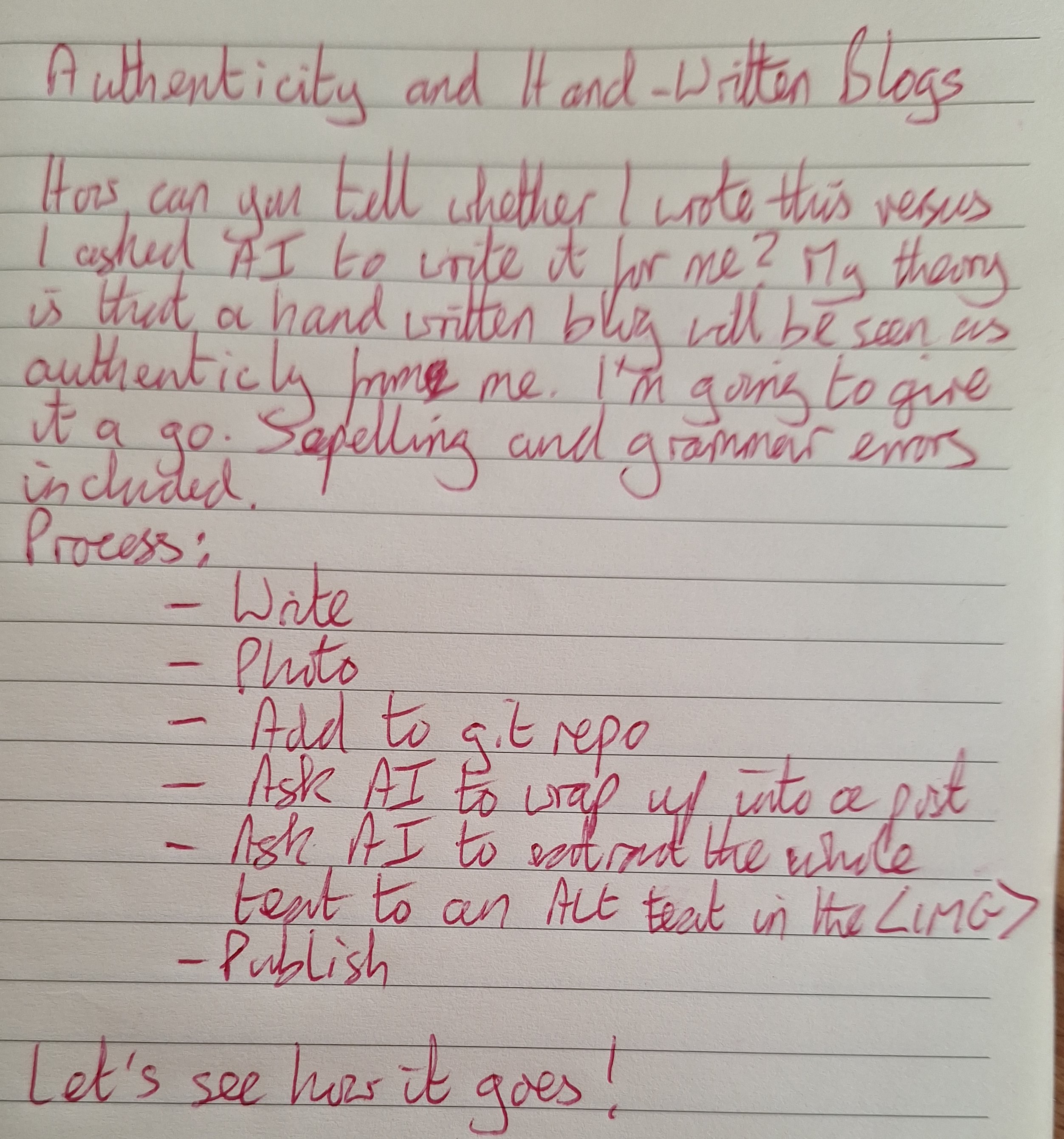
Authenticity and Handwritten Blogs
June 19, 2026
Mistral LLM Agent Works As GitHub Copilot Replacement
May 05, 2026
I have been working to find an alternative to GitHub Copilot for LLM agent coding on my mobile. With Mistral releasing their remote agents, that is now possible.
The flow I have got working for me is:
- Create an issue in GitHub
- Start a new Mistral coding session at chat.mistral.ai/chat
- Ask Le Chat to fix the GitHub issue, pasting in the link
- Review the resulting PR. Either send feedback to Le Chat, or merge.
Tailscale SSH on Windows
January 12, 2026
Tailscale SSH on the server side for automation of authentication is not supported on Windows.
However, standard SSH key pairs and SSH config files work normally on Windows.
Use traditional SSH setup instead:
- Generate and configure SSH key pairs
- Set up the SSH config file (
~/.ssh/config) - Connect through Tailscale’s network using standard SSH with key-based authentication
Termux UV PyPI Configuration
November 19, 2025
I wish I’d found the Termux-specific PyPI index sooner. This PyPI has wheels pre-compiled to run under Termux.
Here’s how to set it up as the default under Termux.
The Configuration File Location
In Termux, uv looks for the configuration file at:
~/.config/uv/uv.toml
Full absolute path in Termux:
/data/data/com.termux/files/home/.config/uv/uv.toml
Creating The Configuration
uv doesn’t create this file automatically. Create the directory and file:
mkdir -p ~/.config/uv && touch ~/.config/uv/uv.toml
Adding The Termux Index
Edit the configuration file:
nano ~/.config/uv/uv.toml
Add the Termux user repository:
[[index]]
name = "termux"
url = "https://termux-user-repository.github.io/pypi/"
Verification
Test with:
uv pip list
Or:
uvx <package-name>
The verbose output will show if uv picks up the configuration.
Copier _subdirectory Best Practice: Keep Template Files Organised
November 18, 2025
Copier’s getting started documentation doesn’t mention the _subdirectory setting, but you need it if you’re going to have a template in a repo that you then want to apply to multiple projects. See:
_subdirectory.
The Problem
By default, Copier expects template files to live in the repository root alongside configuration files like copier.yml, README, and other repository metadata. This quickly becomes confusing, especially accidentally copying the .git folder from the template.
The Solution
Use the _subdirectory property in your copier.yml to specify a dedicated folder for template files:
_subdirectory: template
This tells Copier to look for template files in the template/ directory rather than the repository root. Your repository structure becomes:
my-copier-template/
├── copier.yml              # Configuration
├── README.md               # Template documentation
├── .gitignore
└── template/               # All template files here
    ├── src/
    ├── tests/
    └── README.md
Further Reading
The Copier maintainers recommend this approach for keeping templates organised. The official documentation covers additional _subdirectory use cases.
Pydantic In Termux? Install Rust And Some Patience
November 04, 2025
Installing Pydantic in Termux requires building from source. The solution: install Rust and wait.
The Problem
Attempting to pip install pydantic in Termux fails because pydantic-core needs to be built from source. No precompiled wheel is available for the Termux environment.
The Solution
Install Rust, pkg install rust then let pip build pydantic-core from source.
The build takes approximately 10 minutes. Let it run in the Termux window without interruption.
A Better Solution
Use uv with the Termux PyPI repository which provides precompiled wheels. This avoids the need to build from source and is significantly faster.
Asking Copilot To Write Diagnostic Scripts When Stuck
November 01, 2025
When Copilot gets stuck trying to directly fix a problem, asking it to write a diagnostic script can help get unstuck.
The Pattern
Instead of repeatedly asking Copilot to fix the issue directly, request a standalone diagnostic script. The script should:
- Test different configurations to isolate the problem
- Output detailed information about what works and what doesn’t
- Be independent and easy to run
Example
Whilst fixing a web scraper that was getting 403 errors, direct attempts to fix the issue went in circles. Asking Copilot to write a diagnostic script revealed that the issue was missing HTTP headers.
The diagnostic script tested multiple header combinations and logged the results, making the root cause obvious. See diagnose_403.py for the implementation.
Why This Works
- Diagnostic scripts gather facts rather than making assumptions
- The output provides concrete data for subsequent fixes
- The script becomes documentation of the investigation process
- It’s faster than iterative trial-and-error
Termux API Install Needs to Be from F-Droid
October 27, 2025
Quick fix for a key signing error when using Termux API.
The Problem
Installed Termux from F-Droid, then installed Termux:API via command line:
pkg install termux-api
When attempting to use the API (e.g., termux-storage-get), encountered a key signing error preventing the API from functioning.
The Solution
Install Termux:API from F-Droid, not via pkg install.
Both Termux and Termux:API must come from the same source (F-Droid) to have matching signatures.
The Steps
- Open F-Droid
- Search for “Termux:API”
- Install the Termux:API app
- The command-line tools will now work correctly
References
GitHub Copilot CLI Running On Raspberry Pi
October 23, 2025
This post is being written from GitHub Copilot command line running on a Raspberry Pi.
I attempted to get the install working on Termux on Android first, but couldn’t get it to work. The Raspberry Pi installation was straightforward by comparison.
Google Vision Handwriting Recognition Works!
October 14, 2025
Got Google Vision working on Android mobile. Example picture worked perfectly.
Testing on Android
The entire workflow runs on Android mobile using Termux:
- Set up Google Vision API with service account credentials
- Transferred credentials securely via Tailscale
- Ran the Python script directly on the phone
- Recognition accuracy was excellent
Example Test
Tested with a hand-drawn workflow diagram showing the process: paper → Google Vision API → GitHub. The API accurately recognised the handwritten text written in casual handwriting.
Results
Text accuracy: Excellent - recognised handwritten notes accurately
Setup simplicity: Straightforward once grpcio installation sorted
API response time: Fast enough for real-time use
See the complete working code on GitHub.
The gvision-text repository contains the full working implementation and setup instructions.